For breweries and taprooms
Brewing is hard. Running the brewery shouldn’t be.
PintDeck runs your menus, kegs, brewing and mug club from one tap list.
14 days free · Cancel anytime · Import your beer list · Works with Square and Fire TV
Pouring at [PLACEHOLDER: launch brewery name]
- iPhone
- AndroidComing soon
Sound familiar?
Four headaches every taproom knows.
Your regulars
A mug club with no app required.
Free and paid levels, punch cards, birthday pints and perks you hand out yourself. Regulars join with a name and a phone number, and each one gets a member card.
- On SquarePerks come off the ticket on their own.
- With StripePaid levels bill by card, to your own account.
- By handNo register needed. Staff look the member up and tap Redeem.
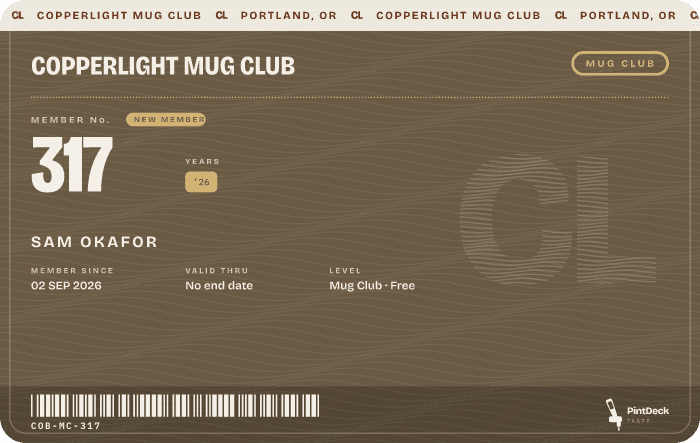
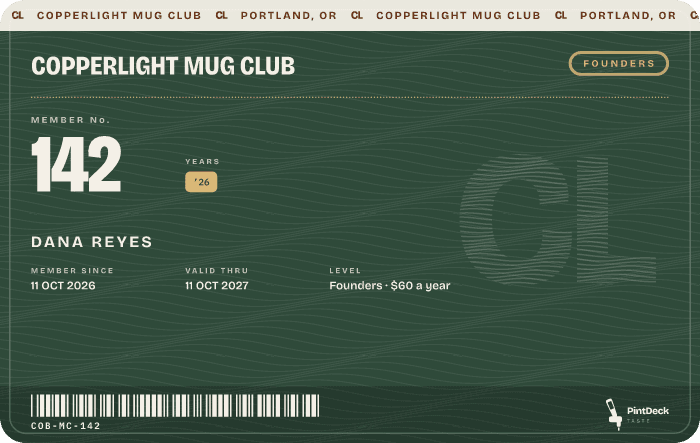
Four quick questions. You can change anything later.
Back of house
The cellar and the brewhouse, on the same list.
Know where every keg is, and when it’ll kick.
A QR code on every keg, scanned with your phone. No per-keg fees.
How: 1.8 bbl at the last count − 0.3 poured since = 1.5 ÷ 2.1 a week = 5 days Details ›
Every fermenter, brite and serving tank on one timeline.
Brew day, off the whiteboard. See when each tank frees up.
Built for a Friday night
Fast enough to use mid-rush.
Every keg, at a glance.
Clean, full or dirty, the beer in it, and where it is.
What’s running low.
Every beer on tap, the one that runs out first at the top.
Who came back this week.
How many of your drinkers came back for a beer on a second day.
Use the pieces you need
Don’t use TV menus? Start with your kegs or your club.
PintDeck comes in three parts, and each one works without the others. Track kegs and plan tanks without a screen in the building, or run a mug club and leave your menus as they are. Add the rest when you’re ready.
Menus
TV menus & promotionsThemes, promotions and playlists that run themselves.Website & print menusYour website and printed menus, from the same list as your TVs.On its own, it replaces your menu app.
Keg management & brewing
Keg trackingEvery keg scanned, located, and forecast to kick.Brew & tank schedulingEvery fermenter, brite and serving tank on one timeline.Beer list & recipesOne beer list behind everything, from recipe to tap.On its own, it replaces the keg spreadsheet and the whiteboard.
Pricing
One fair price. Everything in the plan included.
Running more than one taproom? Talk to us about a discount for the second.
Taster
$39a month
billed yearlybilled monthly
Great menus for less than you pay now
ReplacesYour menu subscription
Start freeBrewhouse
$119a month
billed yearlybilled monthly
Run the whole taproom in one place
ReplacesYour menu app, keg tracker and loyalty add-on
Start freeReserve
$239a month
billed yearlybilled monthly
For breweries that run like a brand
ReplacesAll of that, plus an events tool
Start free14 days free · Cancel anytime · Import your beer list · Month-to-month or yearly
Get started
Sign up today. Get started in minutes.
No sales call, no waiting on us. Make an account and the setup guide walks you through the rest, one step at a time.
- 01Pick what you wantMenus, kegs, regulars, or all three. Those get set up first.
- 02Add what’s on tapType your beers in, or import a list.
- 03Go livePick a look from 100+ themes, then put your menu on the TV, your website and the tables.
Do I need TVs?
No. TVs are one place your menu shows. It’s also on your website, your printed menus and Taste, and nothing in keg management, brewing or the club needs a screen.
Which Fire TV Stick do I need?
The Fire TV Stick 4K Max (2nd gen) is the one PintDeck is tested on and recommended for. Most other Fire TV Sticks and Cubes on Fire OS should work too. The PintDeck app is free on the Amazon Appstore. Amazon’s newest sticks (the 4K Select, the 2026 HD and the 2026 4K) run Vega OS instead: PintDeck runs there too, but can’t reliably keep the screen awake, so they aren’t recommended. The oldest sticks, on Fire OS 5, can’t run it at all.
Do I need Square?
No. On Square, perks apply at the register on their own. Not on Square? Paid levels bill through Stripe and staff tap Redeem in PintDeck.
Do members need an app?
No. A name and phone number is enough. Taste is optional.
What do I need to track kegs?
A phone with the PintDeck Business app. Put a printed QR code on each keg and scan it, or count kegs by hand. No scanner to buy.
Do you charge per keg, per screen or per member?
No. Everything in your plan is included.
I’m on another menu app. Can I bring my list over?
Yes. Import your beer list from a spreadsheet or your old menu app’s export, and keep your old menus running until you’re ready.
Can I change plans later?
Yes. Move up or down from your account whenever you like.
Does it do TTB reports?
Not yet. PintDeck works alongside Ekos, Ollie and Beer30 for TTB and accounting.
What happens when I start?
Make an account and start your 14 free days. The setup guide walks you through the rest: what to set up first, what’s on tap, and your first menu.
Tell us what you pour and what’s giving you headaches.
14 days free · Cancel anytime · Import your beer list