Features
Everything behind the bar, in one place.
Menus, kegs, brewing and your regulars, in three parts you can take one at a time. Pick a tool to see how it works.
TV menus that run themselves.
Pick one of 100+ templates or make your own, mix in promotions, and let playlists and scheduled changes keep every screen right.
- Your look
Any template, horizontal or vertical. Change any font, color or line, and save it as yours.
- PromotionsBrewhouse
Upload a flyer, or build one with text over a photo.
- Playlists
Menus and promotions take turns on each TV, for as long as you set.
- Scheduled changesBrewhouse
Prices, promotions and taps change on the day and time you pick.
- Fire TV or any browser
Type the 6-digit code. Changes show up in seconds. Apple TV and Roku are coming soon.
2 TV menus and playlists on Taster · unlimited from Brewhouse · any number of TVs
On the Taproom TV now: Taproom TV
Change a beer once. Every menu shows it.
Your TVs, your website and your printed menus read one list. Mark a beer sold out, rename it or change its price, and each one shows the change.
- Website menu
One line of HTML for Squarespace, Wix, WordPress or any site, in the same theme as your TVs.
- Print menusBrewhouse
Table tents, rack cards and full menus from the same list.
- On PintDeck Taste
Drinkers see what’s pouring on your brewery page.
Website menu on every plan · print from Brewhouse
Know before a beer runs out.
Count kegs by hand or scan them with your phone. PintDeck turns those counts into the day each beer runs out.
- Run-out datesReserve
Every beer gets the day it runs out, and the range it could fall in.
- Hand counts
Type how many kegs are left. Zero marks the beer as empty.
- Phone scans
Scan kegs as they’re filled, moved and emptied.
- When to brew
See the days you’d have nothing to pour, before they happen.
Brewhouse and up · run-out dates on Reserve
How: 1.8 bbl at the last count − 0.3 poured since = 1.5 ÷ 2.1 a week = 5 days Details ›
Brew before you run out.
Every fermenter, brite and serving tank on one timeline, and a nudge when a beer needs brewing.
- One timeline
Fermenters, brites and serving tanks, with today marked.
- Brew by
PintDeck works back from when a beer runs out to the day you need to brew it.
- Brew day on your phone
Steps, timers and hop additions, right on the lock screen.
- Cellar tasks
Dry hops, crashes and transfers, due on the right day.
Brewhouse and up
One beer list behind everything.
Add a beer once. Every menu, keg, recipe and card uses it.
- One list
Style, ABV, price, color and art, on every menu.
- Recipes with versions
Grain bill, hops, yeast and process, with every version kept.
- Batches against the recipe
Gravity readings against the target, batch after batch.
- ABV that stays true
When batches drift, one click puts the measured ABV on every menu.
Beer list on every plan · recipes from Brewhouse
A mug club with no app required.
Regulars join at the bar with a name and a phone number. On Square, perks come off the ticket on their own.
- Free and paid levels
Dues through Square or Stripe, or taken in person.
- Perks in four questions
A birthday pint, buy ten get one, a welcome gift.
- At the register
On Square, a perk comes off the ticket on its own.
- Everywhere else
Staff look the member up and tap Redeem.
1 level on Taster · 2 on Brewhouse · unlimited on Reserve
3 perks · 1 of its own, 2 for every level
No dues
5 perks · 3 of its own, 2 for every level
Dues via Square
Fill the room on a Tuesday.
Trivia, releases and live music, with RSVPs or paid tickets, announced to the people who follow you.
- Repeats
Every week, every two weeks, or a set of dates.
- RSVPs or paid tickets
Card payments through your Square or Stripe account.
- Tell followers
A push and an email to everyone who follows you on Taste.
- Tickets in Apple Wallet
Scanned at the door.
Brewhouse and up
Your beers in their pockets.
PintDeck Taste is a free iPhone app where drinkers find you, collect a card for every beer they try, and come back.
- A brewery page that’s always right
What’s on tap, straight from PintDeck.
- A card for every beer
First Pour for the first to log a new release.
- Followers
People who follow you hear about events first.
- Card analytics
Who collects your beers, and who comes back.
Every plan
Straight from the brewery’s own system.
02 · Keg management & brewing
Kegs, tanks and recipes, off the whiteboard.
Scan kegs, plan your tanks and log every batch in one place.
Or count by hand
No scanner needed. Type how many kegs are left and the forecast picks it up.
Brewhouse and upLog how many kegs are left right now. 0 marks the beer as empty.
Scans and counts, one history
Hand counts and keg scans land in the same history, so the run-out date uses both.
Run-out dates on ReserveBrew by
When a beer will run out, and the last day to brew it.
Sidereal runs out around Oct 20. Brew by Wed, Oct 14 to keep it pouring · Sat, Oct 10 fits in FV1 → BT2.
Cellar tasks
What’s due in which tank today, and what’s late.
When the ABV drifts
Batches measured stronger? One click and every menu says so.
Brewhouse and upNo per-keg fees
Tag every keg you own. Your price stays the same.
Brewhouse and up03 · Regulars
Bring your regulars back.
A mug club, events and Taste. The people who join are yours.
Redeem in seconds
Look them up by the code on their phone, or by name or number.
Their card
Their number, their punch card, and the perks waiting.
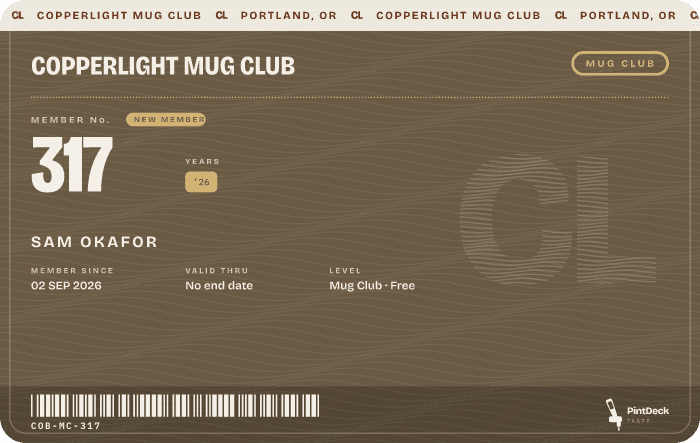
3 more and the next one is on us.
A perk in four questions
Kind, reward, rules, review.
Four quick questions. You can change anything later.
Tell your followers
A push and an email to everyone who follows you, a few times a month.
4 a month on Brewhouse · 12 on Reserve“I’ll be there”
Free events get a head count without anyone holding a seat.
Free, with no seat to save. It helps them plan the night.
Who collects your beers
Collectors, who came back, and your most collected beer.
Which plan has which part?
Taster has menus and a starter mug club. Brewhouse adds kegs, tanks, recipes, print menus and events. Reserve adds stock, run-out forecasts and unlimited club levels.
What do I need to track kegs?
A phone with the PintDeck Business app. Put a printed QR code on each keg and scan it, or count kegs by hand. No scanner to buy.
Can I change plans later?
Yes. Move up or down from your account whenever you like.
Do I need TVs?
No. TVs are one place your menu shows. It’s also on your website, your printed menus and Taste, and nothing in keg management, brewing or the club needs a screen.
Tell us what you pour and what’s giving you headaches.
14 days free · Cancel anytime · Import your beer list